Tuesday, August 28, 2012

myHistro

myHistro is a timeline builder and map creation tool rolled into one nice package. On myHistro you can build a personal timeline or build a timeline about a theme or event in history. Each event that you place on your timeline can be geolocated using Google Maps. myHistro timelines can be created online or you can use the free iPad app to create events on your timeline.

I gave myHistro a try this afternoon and found it rather easy to use after initially spending ten minutes fumbling around and learning the language of myHistro. When you first sign into myHistro you will be shown a screen for creating your first event. An event is a stand-alone item. If you want to create a timeline you need to click on your account dashboard then select "stories" to create a story. "Story" is myHistro's name for timelines. Create a story then add events to your story. Each event can include videos, images, text and be geolocated on a map.

Monday, August 27, 2012

Keen Talks


Keen Talks is an online catalog of videos featuring educational and thought-provoking talks from people across the academic and entertainment spectrums. While Keen Talks is very heavy on science topics, you can find talks on topics in history, economics, entertainment, and technology. You can search Keen Talks by topic, category, or speaker's name.

Friday, August 24, 2012

Spelling City

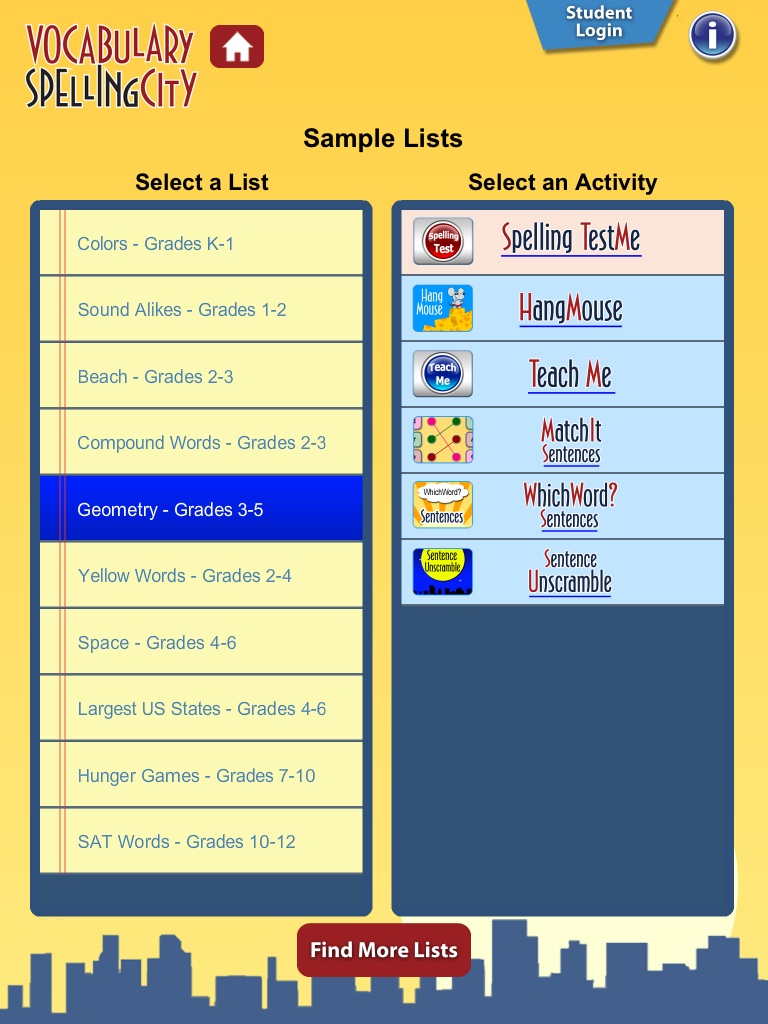
SpellingCity recently launched a free iPad and iPhone app for students. The app gives students access to the same vocabulary lists that they use on the SpellingCity website. SpellingCity's list of words for students exceeds 42,000. Students and teachers who register for accounts can create custom word lists (Note, new lists have to be made online. Through the app you can only access existing lists). If you don't register you can simply choose from the many suggested word lists created by SpellingCity.

The SpellingCity app offers six types of practice activities. The activities are Teach Me, Test Me, Match It, Word Unscramble, Hang Mouse, and Which Word. I am particularly fond of the Teach Me activity in which the words and their spellings are read to students. Again, if you are registered and logged into SpellingCity you can create custom lists that are read to your students when they use the Teach Me mode on their iPads.

You can learn more about the free SpellingCity iPad app here. Or download the app here.

Inside Jobs - Career Website

Inside Jobs is a site that offers information about careers and the training required for them. On Inside Jobs visitors can search for career information by keyword or browse through categorized collections of information. Each career in the list has a short video featuring someone in the industry explaining what they do and how they got into the field. Inside Jobs provides lists of schools that offer programs related to the careers that students are interested in. (Note that the schools do pay to be included on Inside Jobs).

Applications for Education
Inside Jobs could be a good resource for students who want to learn more about a particular career field. It might be a good site to link to from your school's guidance department webpages.

Thursday, August 23, 2012

SoundCloud in a Language Course

Using SoundCloud in a Language Course

SoundCloud is a free tool for creating and sharing sound tracks. On Monday I included it in my list of alternatives to Aviary. Today, I showed it to some teachers at the Bancroft School in Massachusetts. When I showed the option for inserting text comments into the sound tracks a teacher spoke up with an idea for using Sound Cloud in a world languages course.

The suggestion the teacher made was to have students record spoken tracks on Sound Cloud and share them with her. Then she could use the comment feature to provide feedback that is tied directly to each student's recording. The comments could be tied to the exact second at which a student pronounces something incorrectly, uses the wrong verb form, or to praise a student for pronouncing a new word particularly well.

SoundCloud allows you to have up to two hours of recordings stored in your account at one time. After that you need to either delete an old recording or upgrade to a paid plan.

Friday, August 17, 2012

Szoter Demo

Szoter

Szoter - Annotate Pictures and Take Screenshots

Szoter is a free online tool for annotating images that are stored on your computer. You can also use Szoter to capture and annotate screenshots.

You can use Szoter on the web or download the Adobe Air version of it to run on your desktop. Either way you can upload images, draw on those images, and type on those images. When you're done annotating and drawing on your images you can save them to your local computer or share them online through your favorite social networks. Szoter can also be used to capture your screen and create annotated screen captures. The video below provides a demonstration of Szoter.